
Original GoTech guide. Check the exact vehicle and current service information before using procedures or specifications.
What are we trying to establish?
The test compares the camshaft-position signals with the crankshaft-position signal. You’re looking at their relationship, not measuring chain length directly.
- Identify the engine and signals. Confirm the connector, terminal and circuit from the exact vehicle’s wiring information before back-probing. A wire’s position in a connector is not a universal pinout.
- Match the test conditions. Follow the application’s safe test procedure and VVT/base-timing conditions. The original GoTech outline below uses disconnected VVT solenoids for its base-timing comparison.
- Keep the comparison valid. Match the reference to the engine/application and acquisition conditions. Label the channels before analyzing the capture.
Only have the trouble codes so far? Start with the diagnostic sequence.
This is the running check after the Traverse repair
Mike introduces this as part three of the same Traverse series: the engine has been replaced, and the replacement engine received the timing-chain and oil-pump work shown in part two. He reports that it now runs well with no check-engine light and presents these captures as known-good.
There was no cam/crank capture on the failed engine before removal—it had holes in the block. So use this as a documented post-repair reference demonstration, not a measured before/after chain-stretch test.
How this follows the repair · 0:08 · Back to the mechanical timing check
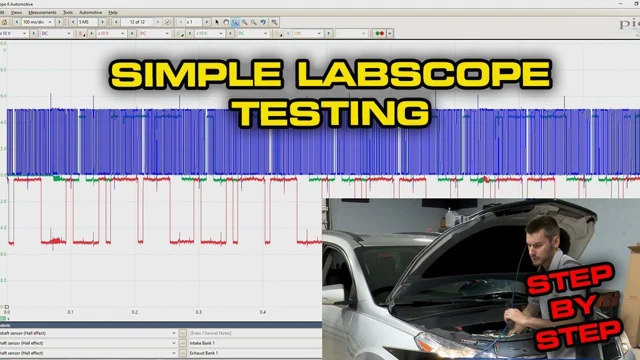
Video loads only when you choose to play.
Set up your labscope to scope 3 channels at a time. Attach a back probe to each lead and make sure your scope is grounded properly
- Locate the bank 1 camshaft-position sensors and crankshaft-position sensor. Identify the signal terminals from the exact vehicle’s wiring information, then use the appropriate back-probing method. ↗ 2:16
- Establish the application’s specified base-timing test conditions. The original written guide calls for disconnecting VVT solenoids; the video narration does not confirm that condition for the displayed capture. Check the service procedure and reference conditions rather than assuming they match.
Make the two captures comparable
- Use the same signals. Know which trace is crank, intake cam and exhaust cam. Don’t compare a mislabeled channel with a reference.
- Look at a complete engine cycle. The GoTech outline compares two crankshaft revolutions. Keep the same reference point and enough detail to see the relevant transitions.
- Check the relationship, not the screenshot size. Scale and zoom can change how the picture looks. Compare the positions of the cam transitions relative to the crank pattern.
- Compare each bank. Keep bank 1 and bank 2 references distinct. The four images below are supporting references, not interchangeable patterns.
Choose a voltage range that shows the complete signals; Mike selects a 10 V range in this demonstration. Set the time base and zoom so you can compare one full engine cycle—two crankshaft revolutions. Watch the scope setup · 3:20
Label channels with their corresponding sensors to aid in waveform analysis ↗ 4:15
Pause the waveform and zoom in on one full engine cycle or two crankshaft revolutions. This will make it easier read waveform and to check the cam/crank timing ↗ 5:18
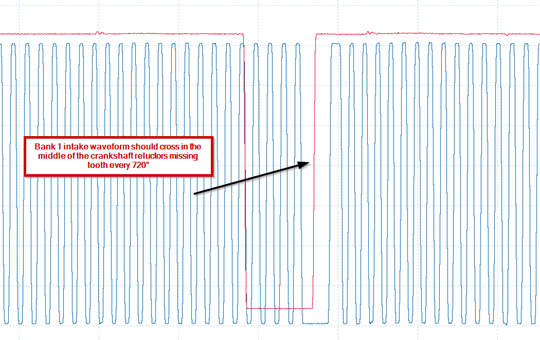
Check pattern of bank 1 intake camshaft position sensor signal, compare with known good pattern ↗ 5:49
Bank 1 intake reference
 Enlarge illustration 1
In this known-good capture, Mike uses the bank 1 intake transition through the crank missing-tooth gap as a reference.
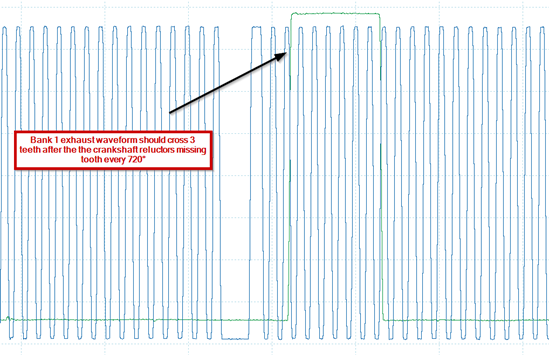
Watch the reference explanation · 5:49Check pattern of bank 1 exhaust camshaft position sensor signal, compare with known good pattern ↗ 6:08
Bank 1 exhaust reference
 Enlarge illustration 2
Bank 1 exhaust uses a different point: the rising transition is about three crank pulses after the gap in this reference.
Watch the reference explanation · 6:08- Locate the bank 2 camshaft-position sensors and confirm their signal terminals from the vehicle’s wiring information before connecting. ↗ 7:15
Acquire waveform using same voltage and time scale and zoom in on one full engine cycle or two crankshaft revolutions. ↗ 8:53
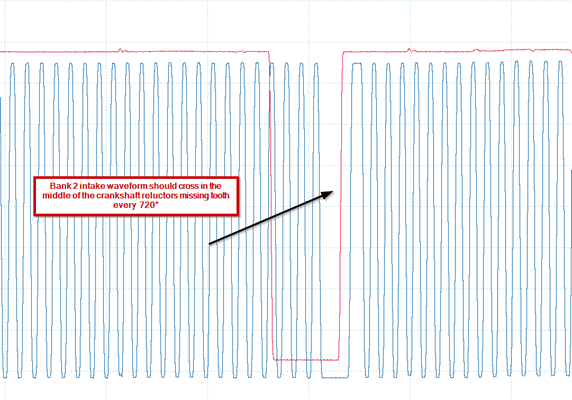
Check pattern of bank 2 intake camshaft position sensor signal, compare with known good pattern ↗ 9:16
Bank 2 intake reference
 Enlarge illustration 3
Bank 2 intake crosses in the missing-tooth gap in the shown reference. Keep this bank label with the image.
Watch the reference explanation · 9:16Check pattern of bank 2 exhaust camshaft position sensor signal, compare with known good pattern ↗ 9:24
Bank 2 exhaust reference
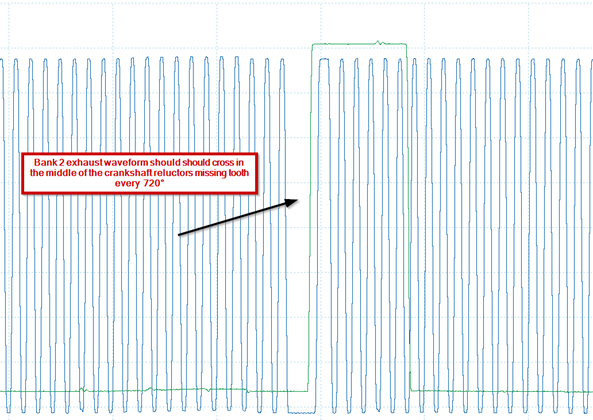 Enlarge illustration 4
Bank 2 exhaust crosses in the other gap, one crankshaft revolution after the intake crossing. Do not substitute the bank 1 exhaust rule.
Watch the reference explanation · 9:24- If a reliable comparison shows a timing discrepancy, follow service information to establish its mechanical cause before choosing the repair.
Doing an engine swap too? Two things Mike found after assembly.
In this Traverse case, the donor harness lacked a connection used by the vehicle’s steering system, so Mike had to swap harnesses. He also found metal debris in the failed engine’s intake manifold and cautions against transferring that contamination to the replacement engine.
Those are findings from this job. They are reasons to check donor compatibility and retained components—not evidence that every timing-chain repair needs a harness or intake manifold.
Harness compatibility · 13:26 · Debris in retained components · 14:57What can you conclude from the waveform?
The patterns agree under comparable conditions
That comparison supports the timing relationship at the time of the capture. It does not establish every operating condition or dismiss an intermittent complaint.
A repeatable offset remains after setup checks
Move to mechanical timing verification using the vehicle’s procedure. An offset is evidence of a relationship problem; it does not, by itself, prove chain stretch or identify the failed component.
The capture or reference is uncertain
Fix the comparison first. Don’t authorize a timing-chain job from a pattern you can’t identify confidently.
Return to the diagnostic decision → · Open the replacement diagrams →
Mike identifies this as part three of the Traverse replacement series. It provides the running, known-good comparison after the repair; no failed-engine before waveform was captured.
Explore the GM timing guides
Source and limits
Original GoTech article, 2022-06-09. Illustrations retain their source descriptions; their technical meaning has not been independently reviewed. Videos and articles remain separate evidence.
Existing tool links may earn GoTech a commission. Commercial descriptions remain attributed to the original article.
Article provenance
Source mdx-ae64408007abdea92409
SHA-256 2b0c3cb3d3087bff8bfb8c9112166d4852ed4b67283444ae0b21e1f39b97a73f